Node.js has become one of the most widely used technologies in modern web development. It’s not just a tool for running JavaScript on the server but a whole ecosystem that has fundamentally changed how developers build scalable and efficient web applications. In this post, we’ll take a closer look at how Node.js works, explore the magic behind the V8 engine, and dig into concepts like callbacks, the event loop, and hoisting to better understand its inner workings.
What is Node.js?
Node.js is a runtime environment that allows developers to run JavaScript outside the browser, primarily on servers. Built on Chrome’s V8 JavaScript engine, Node.js enables server-side scripting, making it possible to build full-stack applications entirely in JavaScript.
One of the core features that make Node.js popular is its non-blocking, event-driven architecture. This allows it to handle a massive number of concurrent connections efficiently, making it an excellent choice for real-time applications like chat apps, online gaming, and streaming services.
The V8 Engine: The Power Behind Node.js
At the heart of Node.js is Google’s V8 engine, which is responsible for executing JavaScript code. Originally developed for the Chrome browser, V8 is written in C++ and is known for its speed and efficiency. Here’s how it works:
- Compilation of JavaScript to Machine Code
V8 translates JavaScript code directly into machine code using Just-in-Time (JIT) compilation. Instead of interpreting JavaScript line by line, it compiles the code into highly optimized machine code during runtime. This process dramatically speeds up the execution. - Garbage Collection
V8 automatically manages memory using a garbage collector, freeing up memory that’s no longer in use. This reduces the burden on developers to manually manage memory, which can be both error-prone and complex.
Event-Driven Architecture: The Event Loop
Node.js is known for its asynchronous, event-driven architecture, meaning it can handle multiple tasks without waiting for one to finish before starting another. This is essential for applications that require high concurrency, like APIs or real-time web apps.
The secret sauce behind this lies in the event loop.
The Event Loop
The event loop is the core mechanism that allows Node.js to handle thousands of operations concurrently with just a single thread. Unlike traditional multithreaded programming models, Node.js uses a single-threaded event loop to handle all requests. Here’s how it works:
- Stack and Queue
When you run Node.js code, any function calls, operations, or instructions are placed in the call stack. If the function makes asynchronous requests (like I/O operations, network requests, or timers), these are passed to the event loop and stored in a task queue. The event loop listens for these tasks to complete and then moves them back to the call stack to be processed. - Non-blocking I/O
Operations such as reading files or making HTTP requests can take time. In Node.js, these operations don’t block the execution of the code. Instead, they are handled asynchronously, freeing up the event loop to continue processing other tasks while waiting for the I/O operation to complete.
Callbacks: The Backbone of Asynchronous Programming
In Node.js, asynchronous operations are typically handled using callbacks. A callback is a function passed into another function as an argument. It gets invoked when the asynchronous operation completes, ensuring that the next steps occur only when the previous task is done.
Callbacks are crucial in Node.js since they allow the system to handle many requests without blocking execution. However, excessive use of callbacks can lead to callback hell, where code becomes deeply nested and hard to read. This is where modern JavaScript features like Promises and async/await offer more elegant solutions.
Understanding the architecture of V8 Engine (the javascript runtime)
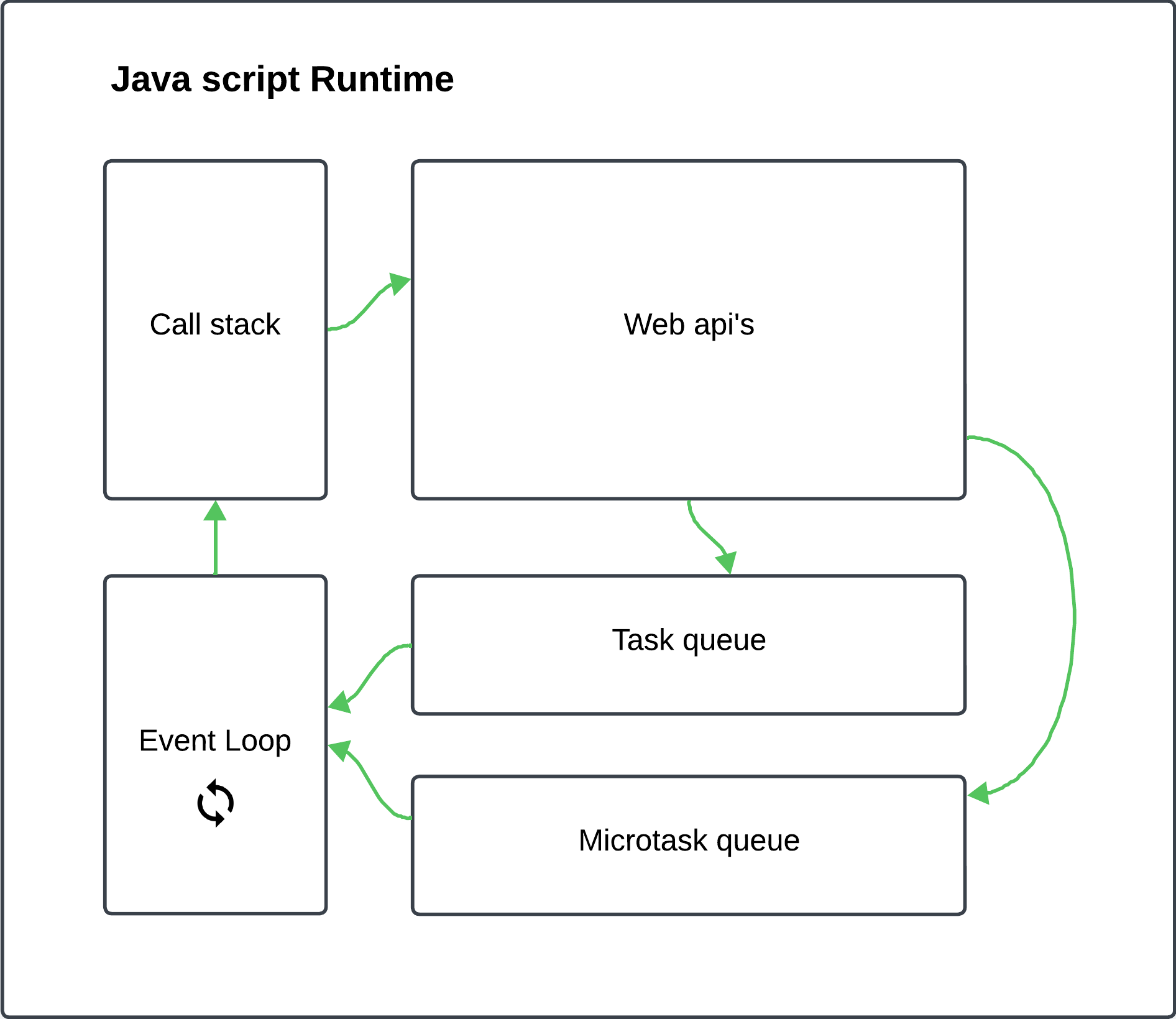
1. Call Stack:
The call stack is where JavaScript keeps track of function executions. Every time a function is called, it gets pushed onto the stack, and once the function is done executing, it is popped off the stack. If you have a synchronous function, it will execute directly from the stack. However, for asynchronous operations like timers, network requests, or file I/O (Node.js), the call stack is only part of the process.
2. Web APIs:
When you make asynchronous calls (like setTimeout, fetch, or event listeners), JavaScript does not execute these directly. Instead, the environment (like the browser or Node.js) handles these through APIs—referred to here as Web APIs. For example, when you call setTimeout, JavaScript delegates this to the environment’s API (which can be the browser or Node.js), and then that API handles the timer for you. Once the timer expires, it sends a callback function back to be queued.
3. Task Queue (also called Callback Queue):
Once an asynchronous operation is completed (e.g., a timer finishes, or data is returned from a server), the callback related to that operation is placed in the Task Queue. The event loop will process this queue and execute callbacks when the call stack is empty.
4. Microtask Queue:
Microtasks have higher priority than tasks. Microtasks include things like resolved promises or MutationObserver callbacks. While tasks are handled after the current execution stack is empty, microtasks are handled as soon as the current operation completes, before the event loop moves to the next task.
5. Event Loop:
The event loop is the engine that ensures JavaScript runs in a non-blocking, asynchronous way, even though it’s single-threaded. It constantly monitors both the Call Stack and the Task Queue. If the call stack is empty (i.e., there are no synchronous tasks left to process), it checks the Task Queue and Microtask Queue and pushes any waiting tasks onto the call stack for execution.
In short, JavaScript can only do one thing at a time (single-threaded), but with the help of the event loop, tasks can be handled in a seemingly concurrent way. Asynchronous tasks (like network requests) get sent to APIs, and their callbacks are queued to be handled later when the call stack is free, preventing the application from being blocked.
Hoisting in JavaScript
Hoisting is another important concept in JavaScript, including in Node.js. It refers to how JavaScript handles variable and function declarations during the compilation phase before the code is executed. Essentially, variable and function declarations are “hoisted” to the top of their scope, meaning you can use them before they’re defined in the code.
However, hoisting can sometimes lead to confusion, which is why modern JavaScript (including in Node.js) encourages the use of let and const for variable declarations. These don’t allow the same kind of hoisting, making code more predictable.
Promises and async/await: Modern Asynchronous Handling
To address the limitations of callbacks, Promises were introduced in JavaScript. A Promise represents a value that may be available now, in the future, or never. It has three states:
- Pending: The initial state
- Resolved: The operation was successful
- Rejected: The operation failed
Node.js has transformed the way developers approach server-side programming by providing a powerful, efficient, and event-driven platform that builds on the speed and power of the V8 engine. Its non-blocking I/O model, combined with its event loop and callback architecture, allows developers to build scalable, real-time applications. Modern features like async/await have further streamlined the process, making asynchronous JavaScript easier to manage.
By understanding the event loop, how V8 executes code, and how JavaScript’s core concepts like hoisting and promises work within Node.js, developers can harness the full potential of this powerful runtime. Whether you’re building a simple API or a complex, real-time system, Node.js offers the flexibility and performance to meet the demands of modern web applications.